¿Quieres saber cómo jugar NieR Re[in]carnation a 120 FPS en PC? Vamos
![Как сделать 120 FPS в NieR Re[in]carnation на LDPlayer?](https://encdn01.ldmnq.com/faq/images/ru/2f5dd93b-533d-4564-bc47-5529e94c5104.jpg?x-oss-process=image/format,webp/quality,Q_100/resize,w_1024)
Tutorial en video:
PASO 1 : Haz clic en Modelo y configura 120 FPS.
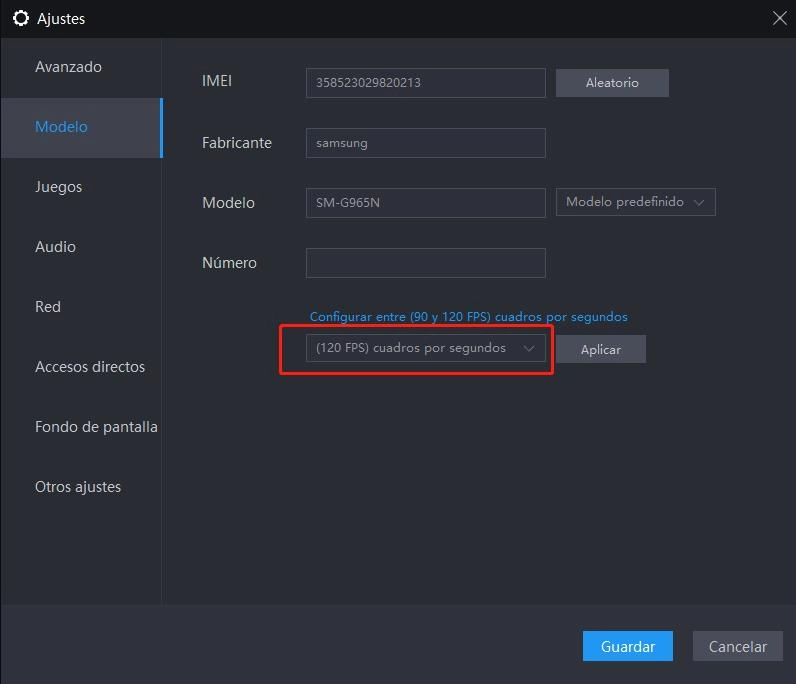
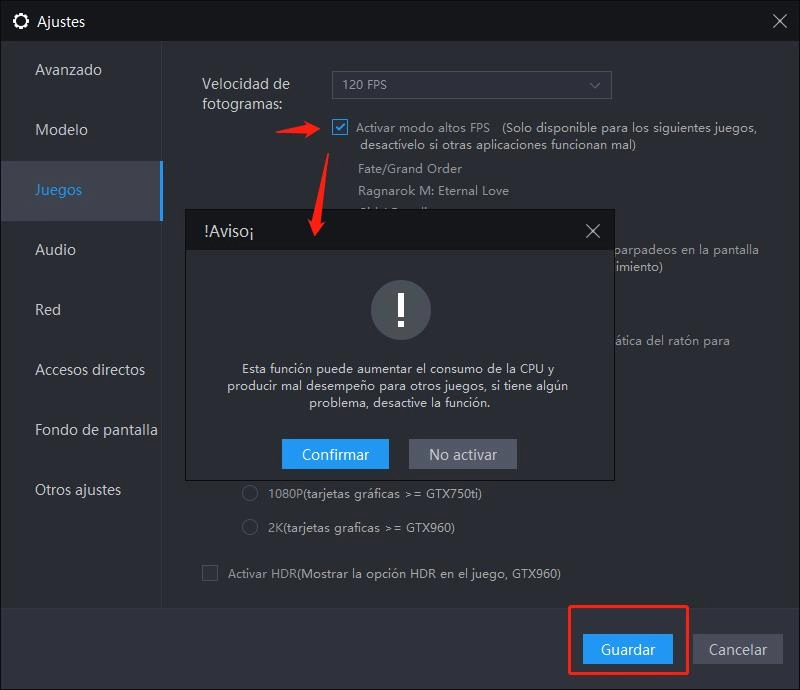
PASO 2 : Haz clic en Juegos y habilita el modo de altos FPS.
Paso 3. En la configuración del juego, selecciona la FPS más alto
![Как сделать 120 FPS в NieR Re[in]carnation на LDPlayer?](https://encdn01.ldmnq.com/faq/images/ru/451fc3f1-b815-43ba-b432-9be5a87a3eda.jpg?x-oss-process=image/format,webp/quality,Q_100/resize,w_1024)
![Как сделать 120 FPS в NieR Re[in]carnation на LDPlayer?](https://encdn01.ldmnq.com/faq/images/ru/49a85e17-72d1-4879-abb9-8cd832ebe692.jpg?x-oss-process=image/format,webp/quality,Q_100/resize,w_1024)
![Как сделать 120 FPS в NieR Re[in]carnation на LDPlayer?](https://encdn01.ldmnq.com/faq/images/ru/4492371b-f342-4a92-98c1-a62e5fe14496.jpg?x-oss-process=image/format,webp/quality,Q_100/resize,w_1024)
¡Ahora puedes jugar NieR Re[in]carnation en LDPlayer a 120 FPS!


![Cómo descargar y jugar NieR Re[in]carnation en (PC) Windows 2021 | Disponible el 28 de julio](https://res.ldrescdn.com/ldstore/iamDnY-1627141460184.jpg?x-oss-process=image/format,webp/quality,Q_100/resize,w_640)